



What Is a Token Approval, and How Do You Check and Revoke It?
A token approval lets a smart contract spend your tokens or NFTs up to a set allowance. Learn why unlimited approvals are risky and how to check and revoke them with Etherscan, Revoke.cash, or wallet tools.

Many Web3 security problems come down to one word: approvals. You may only want to swap a token once, list an NFT, or join a campaign — yet the wallet popup you confirm may grant a contract long-term permission to use your assets. If that permission goes to the wrong party, or the project's contract later becomes compromised, you can lose funds.
A token approval means: you allow a smart contract to spend a certain amount of a specific token or NFT on your behalf. Approvals are not scams by themselves — DeFi protocols, NFT marketplaces, and many DApps need them to work. The real question is whether you know who you are approving, how large the allowance is, and whether you still need it afterward.
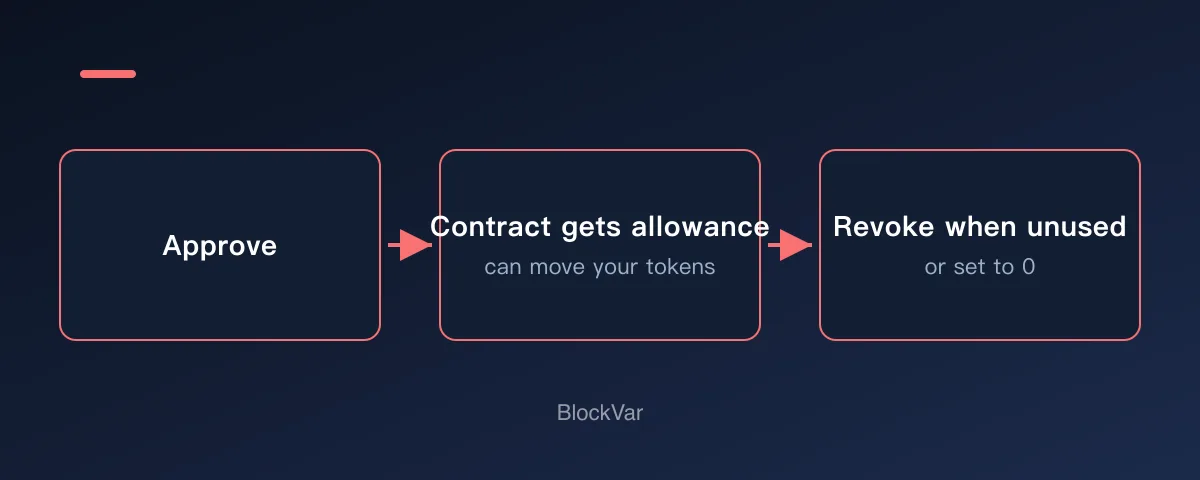
This is an educational diagram: an approval does not move funds immediately, but it gives the contract permission to spend assets within the approved allowance.
If a transfer is like handing money over, an approval is more like giving someone a spending pass with a limit. When you no longer use it, you should check it and take it back.
How approvals differ from transfers
A transfer sends assets from your address to another address. An approval tells a contract: within a certain limit, you may use these assets on my behalf.
For example, before selling an ERC-20 token on a decentralized exchange, you usually approve the trading contract to use that token first. Only then can your swap go through, with the contract moving tokens within the approved allowance according to the trade.
This is why approvals deserve caution. You have not moved assets yet, but you have given a contract the ability to move them in the future.
What is an unlimited approval
To save users from approving repeatedly, many DApps request a very large allowance. That improves convenience — you will not be asked again next time — but it is not always good for security.
If the spender is a trusted, mainstream contract you use long term, the risk is relatively manageable. If the approval goes to an unknown website, a copycat project, or a temporary campaign page, be especially careful. MetaMask's official help center also treats token approvals as a core Web3 safety topic and reminds users to understand exactly what permission they are agreeing to.
How to check existing approvals
You can review approvals with several kinds of tools:
- Wallet-native or companion tools, such as the approval management feature in MetaMask Portfolio.
- Block explorers, such as Etherscan's Token Approvals page.
- Dedicated approval checkers, such as Revoke.cash.
Etherscan's Token Approvals page lists which contracts your address has authorized to spend which tokens. Revoke.cash supports checking and revoking approvals across multiple networks, which makes it handy for periodic cleanups.
When reviewing, focus on:
- Which asset is approved.
- Whether you recognize the spender or contract address.
- Whether the allowance is unreasonably large.
- Whether you will keep using that project soon.
- Whether the project came from an official entry point.
How to revoke an approval
Revoking an approval is itself an on-chain transaction and usually costs gas. In a supported tool, find the approval and choose revoke, or set the allowance to 0. Before confirming, still check the network, the contract address, and the wallet popup.
Prioritize revoking these approvals:
- Websites or contracts you do not recognize.
- Approvals left behind by temporary campaigns, mints, or airdrop pages.
- Projects you have not used in a long time.
- Token or NFT permissions with unusually large allowances.
- Entry points you once visited but can no longer verify.
If you suspect your seed phrase or private key has leaked, revoking approvals may not be enough. An attacker who holds your private key can transfer assets directly. In that case, the priority is moving remaining assets to a brand-new wallet with a safe backup as soon as possible.
Everyday approval hygiene
A simple habit: after trying a new project, note the project name and network; if it was only a one-off, check your approvals when you are done. Keep your main wallet away from unfamiliar sites, and for an experimental wallet, clean up approvals regularly and keep balances low.
You can also lower the allowance. Many wallets and DApps let you set a custom approval amount. It adds one extra step, but it is safer for high-value assets.
FAQ
Does revoking an approval move my assets? Usually not. Revoking changes a permission; it does not send assets to anyone. But it is an on-chain transaction and may require gas.
Is disconnecting from a website the same as revoking? No. Disconnecting usually only ends the site's access to your current wallet session; on-chain token approvals can still exist.
Should every unlimited approval be revoked? Not necessarily. Whether to keep approvals for mainstream protocols depends on how often you use them and your risk tolerance. But approvals for unknown projects, temporary campaigns, and unidentified contracts should be cleaned up first.
Are approval-checking tools always safe? Access the tools themselves from official entry points. Viewing by address alone is usually low risk, but once you connect a wallet or submit a revoke transaction, verify the domain and the popup contents again.
Related Reading
- Does Disconnecting a Wallet Remove Token Approvals?
- What Does “Sign Message” Mean in a Crypto Wallet?
- How to Check a Web3 Project Before Connecting Your Wallet
- What Does Minting an NFT Mean? A Pre-Mint Checklist
- What Is a Crypto Airdrop, and How Do You Claim One Safely?
- Your Wallet Was Drained: What to Do in the First 30 Minutes
References
- MetaMask Help Center: What is a token approval? - https://support.metamask.io/stay-safe/safety-in-web3/what-is-a-token-approval/
- MetaMask Help Center: How to revoke smart contract allowances/token approvals - https://support.metamask.io/more-web3/learn/how-to-revoke-smart-contract-allowances-token-approvals/
- Etherscan Token Approvals - https://etherscan.io/tokenapprovalchecker
- Revoke.cash - https://revoke.cash/
Keep reading
Is There a MetaMask Airdrop? Rewards After Season 1 and the $MASK Question
MetaMask says there are no current plans for a $MASK token, and Rewards Season 1 has ended. What Rewards offers now and how to spot fake airdrops.

Wallet Hacked? What to Do First, Step by Step
After a wallet hack, find the cause first: a leaked seed phrase means a new wallet; abused approvals mean revoking. The steps, per MetaMask and Revoke.cash.
What Is Address Poisoning? Zero-Value Transfer Scams and How to Avoid Them
Address poisoning slips a look-alike address into your history with a zero-value transfer. How it works and how to avoid it, per MetaMask and Etherscan.
Is Abstract Global Wallet Safe? Where the Keys of an Email-Login Wallet Live
Abstract Global Wallet lets you sign in with email, a social account or a passkey. From the official architecture docs: how the smart-contract wallet works, how its key is split into three shards, what recovery depends on, and the risks of session keys and cross-chain transfers.
How to Set Up a Binance Account: Regions, Verification, Security
Settle regional availability and verification tier before registering. Why funding carries more risk than fees, and four settings to finish on day one.
OKX Account vs Web3 Wallet: What to Settle Before You Start
One app holds two different things: a custodial exchange account, and a self-custodial Web3 wallet whose recovery phrase nobody can restore for you.