



What Is a Transaction Hash, and How Do You Check It?
A transaction hash, often called a TxHash, is a unique identifier created for an on-chain transaction. It works like a tracking number for blockchain activity.

Many beginners search for “transaction hash check status” only after something feels confusing in a wallet or DApp. This guide starts with a plain answer, then walks through a realistic scenario, practical checks, and common mistakes.
It is not financial advice, legal advice, or a security audit. Treat it as a beginner checklist that helps you slow down before you connect a wallet, sign a message, grant approval, bridge funds, or submit a transaction.
Plain Answer
A transaction hash, often called a TxHash, is a unique identifier created for an on-chain transaction. It works like a tracking number for blockchain activity.
The Part Beginners Usually Miss
A transaction hash turns a vague app message into a verifiable chain record. Wallets, DApps, and browser sessions can lag or fail to update, but block explorers show whether the transaction was mined, whether it succeeded, how much gas was used, and which contracts were touched. Support teams may ask for a TxHash to diagnose a transaction; they should not need your seed phrase or private key.
Why This Matters
A website can freeze, a wallet can close, or a DApp can show an unclear message. A block explorer gives you a better way to check whether the transaction is pending, successful, failed, or never broadcast.
A Common Scenario
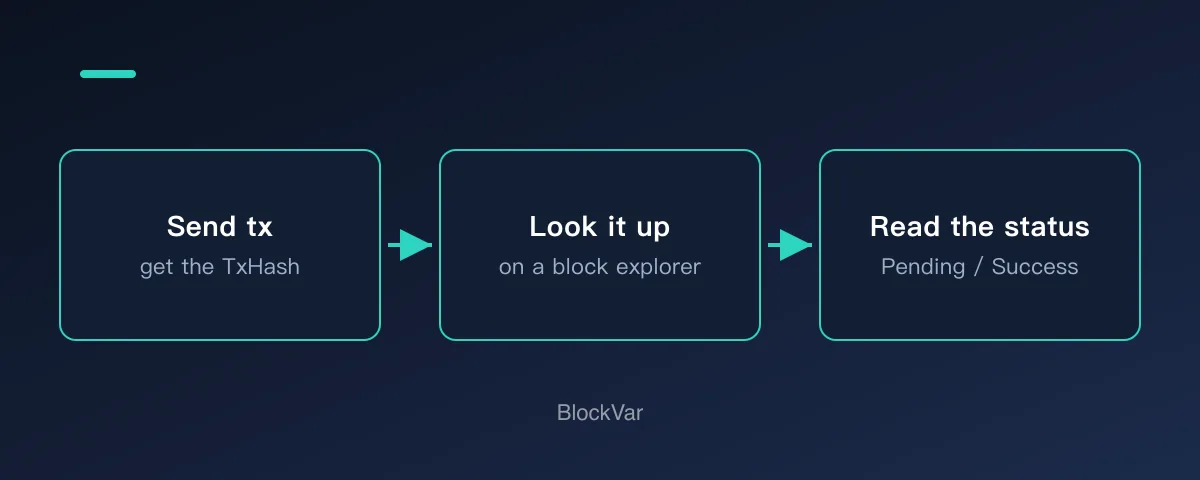
After confirming a transfer or swap, the app keeps spinning. Copy the transaction hash from the wallet activity tab and open it in the correct block explorer for that network.
A Simple Decision Rule
After confirming a transaction, keep the TxHash. Status, failure reasons, gas usage, and asset movement can all be checked from that identifier.
Beginner Checklist
- Copy the transaction hash from your wallet or app result page.
- Open the explorer for the network you used.
- Check status, block confirmations, from, to, gas, and logs.
- If it failed, understand the reason before trying again.
Get into the habit of saving the hash. It is the only thing you hold that proves the transaction happened, and a chat screenshot carries none of the same weight.
Common Mistakes
- Searching on the wrong network explorer.
- Submitting the same action repeatedly while the first transaction is pending.
- Trusting only the app UI instead of checking the chain record.
What to Do Next
Bookmark the block explorer for each network you use. When something looks wrong, your first action should be to look up the hash, not to ask in a group chat — the hash gives a definite answer and chat does not.
Three states cover almost everything: pending means it is still waiting to be included, success means it executed, failed means execution stopped but the gas was still spent. If something stays pending for a long time, check whether the gas setting was too low before trying to speed it up or cancel — do not simply send the same transaction again.
Related Reading
- Why Can’t I See My Tokens in a Wallet or DApp?
- What Are Gas Fees in Web3, and Why Can Failed Transactions Still Cost Money?
- What Is Base Network, and How Do You Start Safely?
- How Do You Withdraw Assets from a Layer 2 to Mainnet or an Exchange?
- What Is an RPC Endpoint, and How Do You Switch It in Your Wallet?
- What Is a Testnet, and How Do You Get Test Tokens from a Faucet?
- Sent Crypto on the Wrong Network? What You Can Still Do
- USDT Transfer Still Hasn't Arrived? Troubleshoot in This Order
References
- Ethereum.org transactions: https://ethereum.org/developers/docs/transactions/
- Ethereum JSON-RPC transactionHash field: https://ethereum.org/developers/docs/apis/json-rpc/
- Etherscan: https://etherscan.io/
Keep reading
Is There a MetaMask Airdrop? Rewards After Season 1 and the $MASK Question
MetaMask says there are no current plans for a $MASK token, and Rewards Season 1 has ended. What Rewards offers now and how to spot fake airdrops.

What Are Web3 Points? Do Points Turn Into Tokens?
Points are a project's own participation record; whether they convert, and into what, is the project's call. Examples from Grass, MetaMask Rewards and Abstract.
What Is a Sybil Address? How Airdrops Filter Them Out
Being flagged as a Sybil means a project decided many addresses belong to one person. How detection works, per the Arbitrum Foundation's published methodology.
USDT on TRC20 or ERC20? Networks, Fees and Checks Before You Send
TRC20 and ERC20 are USDT on TRON and Ethereum. Addresses, fees and checks differ. Based on Tether, TRON and Ethereum docs: how to choose and what to check.
What Is Address Poisoning? Zero-Value Transfer Scams and How to Avoid Them
Address poisoning slips a look-alike address into your history with a zero-value transfer. How it works and how to avoid it, per MetaMask and Etherscan.
What Are Layer3 Liquid Rewards? CUBE Mint Rebates and L3 Lock Tiers
Minting a CUBE on Layer3 can earn L3 back at up to 100%, in five tiers set by locked L3 or L3 plus a league. See the conditions, how to claim and why the rate is not a yield.