



Why Can’t I See My Tokens in a Wallet or DApp?
If a wallet or DApp does not show a token, it does not always mean the asset is gone. Common causes include the wrong network, pending transactions, token detection limits, unsuppo

Many beginners search for “tokens not showing in wallet or dapp” only after something feels confusing in a wallet or DApp. This guide starts with a plain answer, then walks through a realistic scenario, practical checks, and common mistakes.
It is not financial advice, legal advice, or a security audit. Treat it as a beginner checklist that helps you slow down before you connect a wallet, sign a message, grant approval, bridge funds, or submit a transaction.
Plain Answer
If a wallet or DApp does not show a token, it does not always mean the asset is gone. Common causes include the wrong network, pending transactions, token detection limits, unsupported assets, or connecting the wrong address.
The Part Beginners Usually Miss
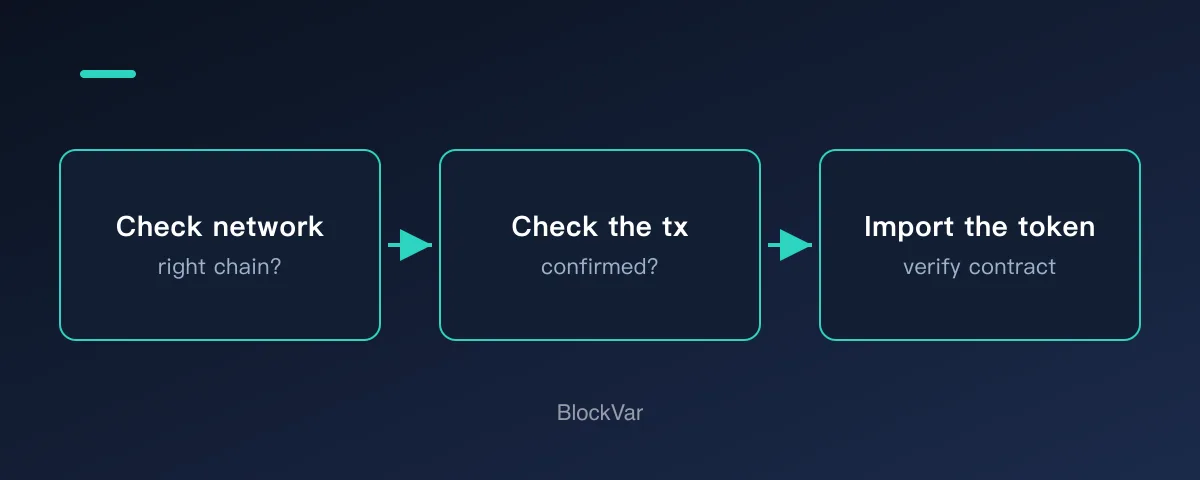
When a token is not visible, do not immediately assume it is lost. The same address can hold different assets on different networks, and tokens with similar names may exist on multiple chains. Wallets and DApps display what their front end can read; the asset record itself lives on-chain. Check the transaction hash first, then network, address, and token contract support.
Why This Matters
Beginners often expect every DApp to read every asset automatically. In reality, the app needs the correct address, the correct network, and support for the asset or token contract.
A Common Scenario
You receive a token and see it in one place, but another DApp shows a zero balance. Before sending funds again, check the transaction status, network, address, and token contract.
A Simple Decision Rule
If a token display looks wrong, check the chain record before sending again.
Beginner Checklist
- Check the transaction hash on the right block explorer.
- Confirm the wallet and DApp are on the same network.
- Make sure the connected address is the one that holds the asset.
- If needed, import the token contract into the wallet.
Note the result of each step as you go. If you do end up asking support or a community for help, that record is far more useful than saying it does not work.
Common Mistakes
- Confusing assets on different networks.
- Trusting only the token logo or name.
- Sending again before checking the first transaction.
What to Do Next
Work through network, then address, then token, then transaction status, changing one variable at a time. Changing several at once makes it impossible to tell which step was wrong. If all four check out and the balance still does not appear, switch to a different RPC endpoint — that resolves most remaining cases.
Once you have confirmed the funds are on-chain, do not resend the transfer just because the interface has not caught up. Duplicate transfers are the most common way people turn a display problem into a real loss.
Related Reading
- What Is a Transaction Hash, and How Do You Check It?
- What Is a Web3 Wallet, and How Is It Different from an Exchange Account?
- How to Check a Web3 Project Before Connecting Your Wallet
- What Is a Cross-Chain Bridge? A First-Timer's Checklist
- What Is an RPC Endpoint, and How Do You Switch It in Your Wallet?
- USDT Transfer Still Hasn't Arrived? Troubleshoot in This Order
References
- MetaMask: balance incorrect or missing token: https://support.metamask.io/manage-crypto/tokens/what-to-do-when-your-balance-of-tokens-is-incorrect/
- Ethereum.org transactions: https://ethereum.org/developers/docs/transactions/
- Etherscan: https://etherscan.io/
Keep reading
Is There a MetaMask Airdrop? Rewards After Season 1 and the $MASK Question
MetaMask says there are no current plans for a $MASK token, and Rewards Season 1 has ended. What Rewards offers now and how to spot fake airdrops.

What Are Web3 Points? Do Points Turn Into Tokens?
Points are a project's own participation record; whether they convert, and into what, is the project's call. Examples from Grass, MetaMask Rewards and Abstract.
What Is a Sybil Address? How Airdrops Filter Them Out
Being flagged as a Sybil means a project decided many addresses belong to one person. How detection works, per the Arbitrum Foundation's published methodology.
USDT on TRC20 or ERC20? Networks, Fees and Checks Before You Send
TRC20 and ERC20 are USDT on TRON and Ethereum. Addresses, fees and checks differ. Based on Tether, TRON and Ethereum docs: how to choose and what to check.
What Is Address Poisoning? Zero-Value Transfer Scams and How to Avoid Them
Address poisoning slips a look-alike address into your history with a zero-value transfer. How it works and how to avoid it, per MetaMask and Etherscan.
What Are Layer3 Liquid Rewards? CUBE Mint Rebates and L3 Lock Tiers
Minting a CUBE on Layer3 can earn L3 back at up to 100%, in five tiers set by locked L3 or L3 plus a league. See the conditions, how to claim and why the rate is not a yield.