



What Is a Wallet Drainer, and How Can Beginners Avoid It?
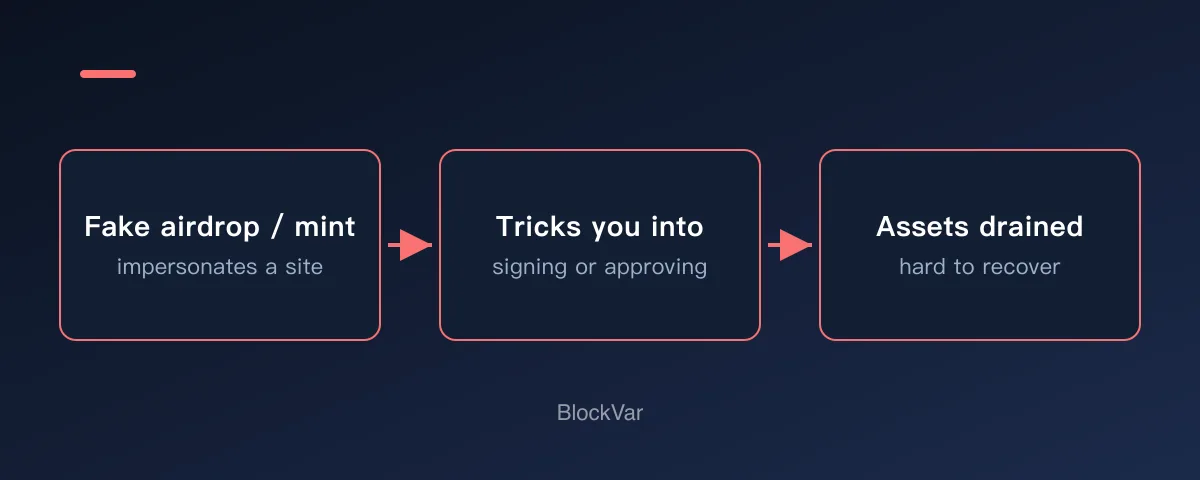
A wallet drainer is a malicious site or script that tricks users into connecting a wallet, signing a message, granting approvals, or sending transactions that can lead to stolen assets. They often pose as airdrop, mint, whitelist, or verification pages.

Many beginners search for “wallet drainer avoid” only after something feels confusing in a wallet or DApp. This guide starts with a plain answer, then walks through a realistic scenario, practical checks, and common mistakes.
It is not financial advice, legal advice, or a security audit. Treat it as a beginner checklist that helps you slow down before you connect a wallet, sign a message, grant approval, bridge funds, or submit a transaction.
Plain Answer
A wallet drainer is a malicious site or script that tricks users into connecting a wallet, signing a message, granting approvals, or sending transactions that can lead to stolen assets.
The Part Beginners Usually Miss
Drainer sites are not always ugly or obvious. They may copy real project pages, use look-alike domains, buy search ads, fake social proof, and label dangerous actions as claims, migrations, checks, refunds, or upgrades. The more a page pushes urgency and easy rewards, the more important it is to return to an official source.
Why This Matters
Drainers are dangerous because they often look like normal Web3 interactions. The user may never type a seed phrase, but still confirm a harmful signature, approval, or transaction.
A Common Scenario
A social post promises a limited claim. The page asks you to connect, then sign or approve. It uses urgency, fake comments, and reward language, but there is no reliable official source.
A Simple Decision Rule
Treat wallet requests from DMs, search ads, urgent claim pages, and surprise rewards as suspicious until verified from official links.
Beginner Checklist
- Start from official websites and documentation, not direct messages.
- Pause when a page uses urgency, claims, subsidies, or surprise rewards.
- Identify whether the wallet popup is connect, sign, approve, or send.
- Use a learning wallet for tests and keep main assets away from unknown sites.
These checks take a few seconds each, and a single mistake here is usually unrecoverable. Measured against that, it is the best return on a few seconds you will find.
Common Mistakes
- Trusting a site because it looks polished.
- Assuming safety because no seed phrase was requested.
- Confirming unreadable signatures under time pressure.
What to Do Next
Fixing your entry points is the strongest defence available: bookmark the DApps you use and open them only from bookmarks, never from search results, group chat links, or ad slots. For anything with a lot of hype around it, use a separate low-value wallet and leave your main one disconnected.
If you suspect you have connected to a malicious site, review your approval list and revoke anything unfamiliar first, then decide whether to move funds to a fresh address. Permissions already granted do not lapse because you disconnected.
Related Reading
- What Does “Sign Message” Mean in a Crypto Wallet?
- What Is a Token Approval, and How Do You Check and Revoke It?
- What Is a Seed Phrase, and Why Should You Never Share It?
- What Is a Honeypot Token, and How Do You Spot One Before Buying?
- What Does Minting an NFT Mean? A Pre-Mint Checklist
- What Is a Crypto Airdrop, and How Do You Claim One Safely?
- What Does DYOR Mean, and How Do Beginners Actually Do It?
- Are Node-Farming Browser Extensions Safe? What to Check First
- Your Wallet Was Drained: What to Do in the First 30 Minutes
References
- MetaMask: signature phishing: https://support.metamask.io/stay-safe/protect-yourself/wallet-and-hardware/signature-phishing/
- MetaMask security alerts: https://support.metamask.io/configure/wallet/security-alerts/
- FTC: phishing scams: https://consumer.ftc.gov/consumer-alerts/2023/05/those-urgent-emails-metamask-paypal-are-phishing-scams
Keep reading
Is There a MetaMask Airdrop? Rewards After Season 1 and the $MASK Question
MetaMask says there are no current plans for a $MASK token, and Rewards Season 1 has ended. What Rewards offers now and how to spot fake airdrops.

Wallet Hacked? What to Do First, Step by Step
After a wallet hack, find the cause first: a leaked seed phrase means a new wallet; abused approvals mean revoking. The steps, per MetaMask and Revoke.cash.
What Is Address Poisoning? Zero-Value Transfer Scams and How to Avoid Them
Address poisoning slips a look-alike address into your history with a zero-value transfer. How it works and how to avoid it, per MetaMask and Etherscan.
Is Abstract Global Wallet Safe? Where the Keys of an Email-Login Wallet Live
Abstract Global Wallet lets you sign in with email, a social account or a passkey. From the official architecture docs: how the smart-contract wallet works, how its key is split into three shards, what recovery depends on, and the risks of session keys and cross-chain transfers.
How to Set Up a Binance Account: Regions, Verification, Security
Settle regional availability and verification tier before registering. Why funding carries more risk than fees, and four settings to finish on day one.
OKX Account vs Web3 Wallet: What to Settle Before You Start
One app holds two different things: a custodial exchange account, and a self-custodial Web3 wallet whose recovery phrase nobody can restore for you.