



How to Spot Fake Airdrop Claim Sites Before You Connect
"Claim your airdrop" is one of the most common entry points for wallet drains. Using real examples from pre-token projects, we cover five signs a claim page is fake, how approval phishing works, and the tools to audit your wallet before and after.

Last updated July 26, 2026. Project token statuses referenced below change over time — verify against official announcements; the detection method itself is evergreen.
Airdrops are Web3's most effective growth tool — and its most concentrated theft vector. The reason is simple: "there is money waiting for you" is the strongest clickbait that exists, and the claiming flow naturally includes "connect wallet + sign/approve" — exactly the actions an attacker needs from you.
Tracking idle-node projects, we keep seeing the same pattern: claim pages appear before a project has even issued a token. DAWN and Gradient are textbook cases — neither had issued a token as of this update, yet searching either name plus "airdrop" reliably surfaces third-party sites offering to "claim now." Those pages are phishing, 100% of the time, no exceptions.
The one rule that does most of the work
No token issued → every "claim" page is fake.
This rule requires zero technical knowledge. To check whether a token exists, look at exactly two places: the project's official website and X account, and whether major trackers (CoinMarketCap, CoinGecko) list the token. If there is no official TGE announcement, you do not need to analyze the page's design or domain any further — close the tab.
We make this point in both our DAWN analysis and our Gradient analysis: those projects' "airdrops" currently exist only as community speculation.
Five checks for projects that do have a token
Once a token genuinely exists, the job gets harder — real claims exist and fakes hide among them. Run these five checks in order:
1. Is the domain the one in the official announcement?
A real claim link will always appear on the official site and pinned official X posts. Fakes rely on lookalike domains: an extra hyphen, a swapped TLD (.com → .io/.app/.claims), or character substitution (rn for m). Always enter through official announcements — never through search results, comment sections, DMs, or group chats.
2. Is it rushing you?
Real claim windows run for weeks or months (Grass's Stage 2 window is six months long). Fakes almost always show a countdown and "final X hours." Urgency exists to make you skip verification.
3. Does it ask for payment first?
"Pay gas to unlock," "deposit to verify your wallet," "claim tax" — real claims charge gas as an ordinary on-chain fee inside your own wallet. Any flow that asks you to send funds to an address first is a scam.
4. What exactly are you signing?
Connecting a wallet is usually harmless; the danger is the next step. Fake pages request token approvals (approve/permit) or ask you to sign opaque messages. Etherscan's official knowledge base describes approval phishing bluntly: once an attacker holds your approval, they can move those tokens for you.
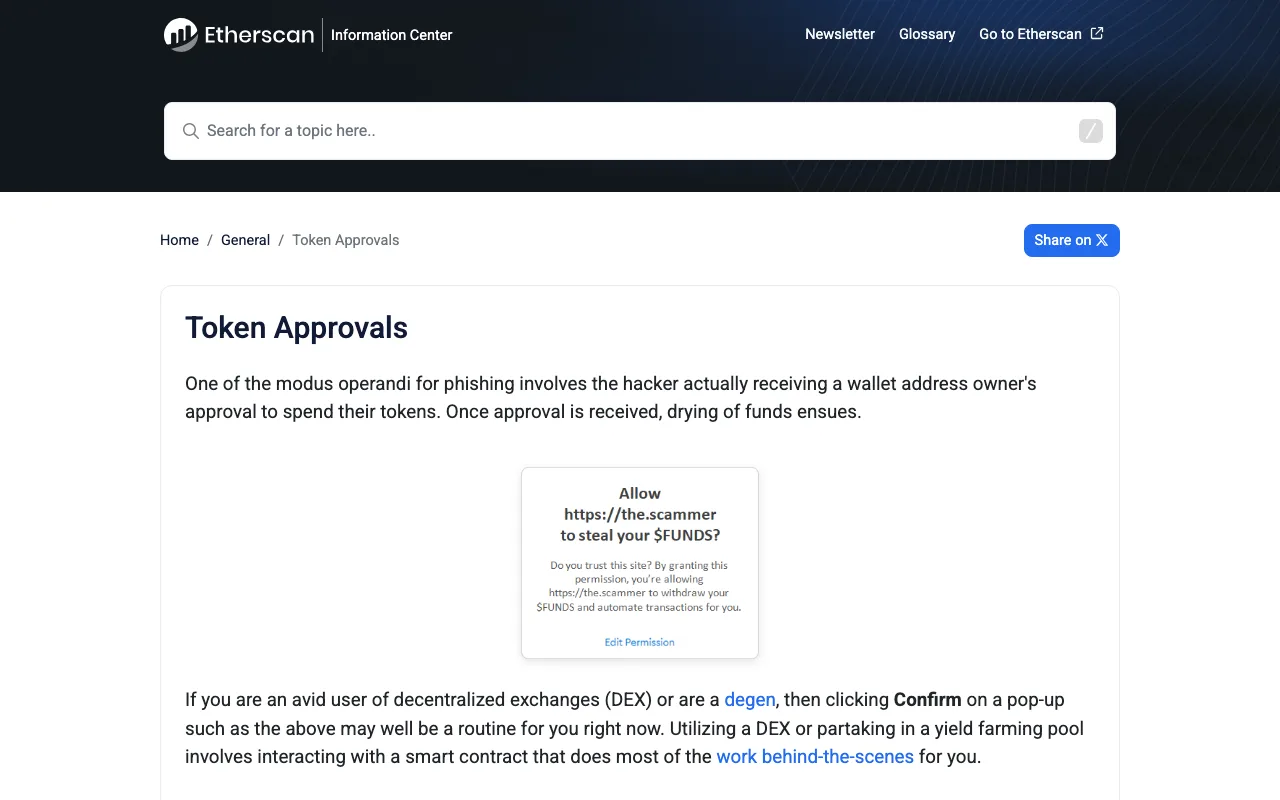
Etherscan Information Center's Token Approvals page — a common phishing pattern is tricking you into granting spend approval. Original page
Before signing, check three things: is the popup a signature or an approval; which token and what allowance (unlimited = maximum danger); does the contract address match the official project on a block explorer. If you cannot read it, do not sign it — see what "Sign Message" means.
5. Corroboration outside the page
Does the official Discord/Telegram mention this claim? Any coverage from established outlets? Does the claim contract show a healthy interaction history on a block explorer? Fakes are typically a fresh domain plus a fresh contract plus zero community discussion.
Already clicked? Audit and damage control
- Connected but signed nothing: low risk — disconnect. Connection alone grants no approvals (does disconnecting remove approvals?);
- Signed an approval: immediately audit and revoke with Revoke.cash — enter your address, review every token approval and its contract, and revoke the suspicious ones. Etherscan's Token Approval Checker does the same job;
- Signed an opaque message: assume a permit-style drain may follow — revoke related approvals now;
- Assets already taken: move everything remaining to a brand-new wallet (new seed phrase) and treat the old one as permanently compromised — see why you never share a seed phrase.
Bookmark Revoke.cash and audit your approval list quarterly — the cheapest insurance in crypto.
FAQ
Can I get drained just by connecting my wallet?
Usually no. Connecting only reveals your address; the real risk is in approvals and signatures. But shady sites do log connected addresses for targeted phishing later — disconnect and stay alert.
Should I use a separate wallet for claims?
Yes — a dedicated low-value "airdrop wallet" is good practice. It caps your downside if something goes wrong, but it does not replace the checks above.
Is mobile or desktop safer for claiming?
The device matters less than the entry point: on any device, only enter claim pages from official announcements. Mobile actually makes full domains harder to read, so be extra careful there.
Related reading
- What Is a Crypto Airdrop, and How Do You Claim One Safely?
- What Is a Token Approval, and How Do You Check and Revoke It?
- What Is a Wallet Drainer, and How Can Beginners Avoid It?
- What Is a Seed Phrase, and Why Should You Never Share It?
- Is This Airdrop Project a Scam? Seven Signals You Can Verify
References
Keep reading
Is There a MetaMask Airdrop? Rewards After Season 1 and the $MASK Question
MetaMask says there are no current plans for a $MASK token, and Rewards Season 1 has ended. What Rewards offers now and how to spot fake airdrops.

Wallet Hacked? What to Do First, Step by Step
After a wallet hack, find the cause first: a leaked seed phrase means a new wallet; abused approvals mean revoking. The steps, per MetaMask and Revoke.cash.
What Is Address Poisoning? Zero-Value Transfer Scams and How to Avoid Them
Address poisoning slips a look-alike address into your history with a zero-value transfer. How it works and how to avoid it, per MetaMask and Etherscan.
Is Abstract Global Wallet Safe? Where the Keys of an Email-Login Wallet Live
Abstract Global Wallet lets you sign in with email, a social account or a passkey. From the official architecture docs: how the smart-contract wallet works, how its key is split into three shards, what recovery depends on, and the risks of session keys and cross-chain transfers.
How to Set Up a Binance Account: Regions, Verification, Security
Settle regional availability and verification tier before registering. Why funding carries more risk than fees, and four settings to finish on day one.
OKX Account vs Web3 Wallet: What to Settle Before You Start
One app holds two different things: a custodial exchange account, and a self-custodial Web3 wallet whose recovery phrase nobody can restore for you.