



Is Idle Node Farming Worth It? An Honest Calculation
No earnings screenshots here — just a framework you can plug your own numbers into: how to compute electricity and hardware costs, which public disclosures to calibrate reward expectations against, and why buying proxies or devices to scale is almost guaranteed to lose money.

Updated August 2026. Every figure cited below comes from project disclosures with sources noted; the framework itself is evergreen — plug in your own numbers.
Every idle-farming promo includes an earnings screenshot, and every screenshot implies the same thing: free money from a computer you were running anyway. This article does the opposite — no screenshots, just arithmetic you can do yourself. The answer to "is it worth it" turns out to depend on three variables: whether your marginal cost is actually near zero, whether the project ever pays out, and whether you spent extra money to farm.
Step 1: compute the real cost
"The computer is on anyway" is the standard self-justification. Split it into cases:
Case A: the device already runs 24/7 (an always-on desktop, NAS, or work machine). Marginal cost of one more browser extension is genuinely negligible. This is the only scenario where "free farming" is an honest description.
Case B: you keep the machine on in order to farm. Then the whole power bill is a farming cost:
Monthly cost = device wattage × 24h × 30 days ÷ 1000 × your electricity rate
A PC idling at 60W on a $0.15/kWh tariff costs about $6.5/month; a 120W gaming rig about $13. Plug in your own wattage and rate — that number is your monthly entry fee, which any points must first outrun.
Case C: you buy things to farm (mining boards, used phones, residential proxies, extra broadband lines). Spoiler: this almost always loses money — calculated below.
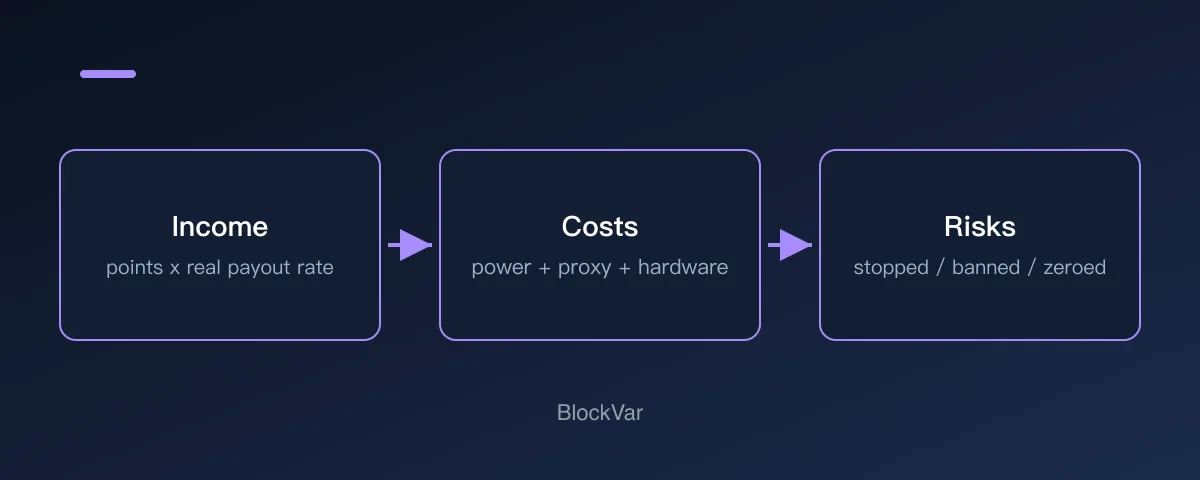
Diagram: the three ledgers of an honest calculation. Counting only the first overstates returns; adding cost and risk often flips the conclusion.
Step 2: calibrate reward expectations with public data
On the income side, ignore promo screenshots and use the projects' own published numbers. The most complete public dataset today is Grass's Stage 2 disclosure. Two figures calibrate everything:
- Conversion rates: Network Points convert at $0.0049 each; Uptime Points at $0.00000007 each — five orders of magnitude between actually-used-bandwidth points and mere-online-time points. Source: Grass rewards allocation
- Distribution: roughly 150,000 users carried about 90% of Stage 2 network traffic, and third-party reporting put the entire Stage 2 pool at just under $3M in USDC covering a ~20-month period. Source: SolanaFloor
Together they mean: rewards concentrate heavily on nodes whose bandwidth customers actually consume (geography and connection quality decide that), and an average-location idle node sits in the long tail. Think in the magnitude of $3M ÷ 20 months ÷ millions of registered nodes and you understand why per-user reality diverges so far from screenshots — those come from the head of the distribution, or from referral commissions.
Points-only projects (DAWN, Bless, and the like) offer no such calibration data at all: conversion rate, total pool, and timeline are unknown, and the terms typically state points may never convert (see DAWN's clause in our analysis). For pre-token projects, the rational earnings estimate is a probability distribution that starts at zero — not a number.
Step 3: discount for risk
Three risk classes directly discount expected value:
- Redemption risk: rewards can stop (Gradient did exactly that), rules can be rewritten (Grass re-weighted payouts), and redemptions can underwhelm (Pipe's workdrop controversy) — all three happened within the past year;
- Ban risk: multi-accounting, proxies, and shared egress zero your points overnight with near-zero appeal success (why accounts get banned);
- Privacy and security cost: liability exposure from sharing a residential IP, and malware risk from unofficial clients (residential IP explainer).
Why "investment farming" almost always loses
Now combine the three steps and evaluate "buy devices/proxies to scale":
- Costs are certain (hardware, proxy subscriptions, monthly power);
- Rewards are uncertain (points may never convert) and actively suppressed by the rules (proxy IPs earn nothing or get banned; same-IP multi-accounts trip risk systems);
- Scaling itself violates every project's community guidelines.
Certain costs × uncertain, rule-suppressed rewards = negative expected value. The only reliably profitable roles in this sector are the people selling proxies, devices, and courses — and the people collecting referral commissions. Which is why every earnings screenshot you see ships with a referral code.
The rational way to participate
After the arithmetic, the sane conclusion is short:
- Participate only with Case A resources: an already-always-on device plus direct home broadband. Marginal cost ≈ 0, so any redemption is pure upside;
- Treat points as lottery tickets, not wages: spend zero extra money on them and build zero financial plans around them;
- Prefer projects with a redemption track record: networks that have already paid real money (like USDC) redeem at meaningfully higher probability than points-only projects — see the current landscape in our idle DePIN comparison;
- Spend five minutes a month re-checking rules: confirming rewards still exist and you have crossed no new red line is worth more than three extra devices.
FAQ
Are the "$X hundred per month" screenshots fake?
Not necessarily fake — mostly non-replicable. They come from high-demand-region quality bandwidth (Stage 2 data shows 150K users carried 90% of traffic), from referral commissions, or from early windows that have closed. What matters for you is the median of the distribution, not a curated head sample.
Is farming on an old phone worth it?
An idle phone draws ~5W, so if you already own one and run official clients, it is a Case A variant. Buying used phones plus proxies to scale drops you straight back into negative-EV territory.
Does running multiple projects at once increase earnings?
It amortizes your time cost, with two caveats: stacked clients can degrade each other's uptime quality, and every additional project is another privacy policy you owe yourself a read of. A few flagship official clients on one device is common practice; a dozen obscure ones is a malware buffet.
Related reading
- Idle DePIN Projects Compared: Who Still Pays, Who Stopped
- What Is a Residential IP, and Why Do Node Projects Want It?
- Why Do Node Accounts Get Banned? The Rules Nobody Reads
- Your Node Points Went to Zero. Now What?
References
Keep reading
Is There a MetaMask Airdrop? Rewards After Season 1 and the $MASK Question
MetaMask says there are no current plans for a $MASK token, and Rewards Season 1 has ended. What Rewards offers now and how to spot fake airdrops.

What Are Web3 Points? Do Points Turn Into Tokens?
Points are a project's own participation record; whether they convert, and into what, is the project's call. Examples from Grass, MetaMask Rewards and Abstract.
What Is a Sybil Address? How Airdrops Filter Them Out
Being flagged as a Sybil means a project decided many addresses belong to one person. How detection works, per the Arbitrum Foundation's published methodology.
What Are Layer3 Liquid Rewards? CUBE Mint Rebates and L3 Lock Tiers
Minting a CUBE on Layer3 can earn L3 back at up to 100%, in five tiers set by locked L3 or L3 plus a league. See the conditions, how to claim and why the rate is not a yield.
How to Earn Abstract XP: Weekly Updates, Badges and the XP Multiplier
According to Abstract's Portal docs, XP comes from using apps listed on the Discover page, streaming and building apps. It updates weekly and cannot be transferred. Learn how badges are earned, where the multiplier comes from and what can cost you XP.
Do Galxe Quest Rewards Cost Money? Claim Fees, Gas and GG Explained
According to Galxe, only quests with a claim fee can award GG. Learn the difference between the platform claim fee and network gas, which networks are supported, how Galxe+ and levels reduce fees, and what to weigh before paying.